DDS Freight / DDS Shipper Import Export - Interfaces : Shipper/Forwarder interfaces (DDS Freight / DDS Shipper)

Shipper/Forwarder interfaces (DDS Freight / DDS Shipper)
Introduction
This document describes the standard interfaces between DDS Shipper Import/Export (DSI) and DDS Freight (DFR).
These make it possible to handle the following exchanges:
DSI => order issued to DFR
DFR => entry of Bookings and transfer to DSI
The booking is created in DSI, after which DFR handles updates by cancel and replace until the validated status is given.
DFR => File input and allocation of orders to file
Shipment created in DSI,
DSI => transmission of shipment’s checkpoints to DFR,
DFR => DSI's checkpoint data are fed at each update.
These interfaces belong to the wider framework of the following forwarder interfaces.
Incoming interfaces
In DFR
DFR_ORD: allowing DSI orders to be integrated into DFR
DFR_PSL: allowing DSI checkpoints to be integrated into DFR
In DSI
DSI_ BOK_IN: allowing DFR bookings to be integrated into DSI
DSI_TC1_IN: allowing DFR shipments to be integrated into DSI
DSI_EVT_IN: allowing DFR checkpoints to be integrated into DSI
Outgoing interfaces
From DSI:
DSI_CMD_OUT: allowing DSI orders to be extracted to DFR
DSI_EVT_OUT: allowing initial checkpoints to be extracted from DSI to DFR
From DFR:
DFR_BOK: allowing DFR bookings to be extracted to DSI
DFR_SHI: allowing shipments to be extracted from DFR to DSI
DFR_PSL_OUT: allowing checkpoint updates to be extracted from DSR to DSI
Interface constants
These interfaces comply with DDS standards on the declaration of interfaces in Back Office and the creation of a suitable work directory structure.
Interfaces will use the .XML format.
Fields of date type will follow the YYYYMMDD format.
Using the interfaces
Interfaces must be declared in Back Office (Maintenance/Interfaces menu).
ITF files usually include the following components:
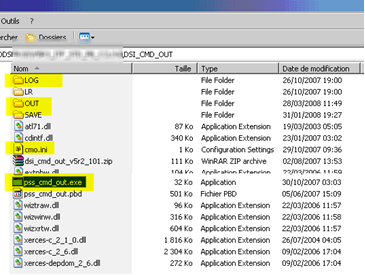
For all interfaces, a .EXE executable file through which the files can be integrated into or extracted to the source application. The interface will be run manually if no scheduler has been set for it (via the Windows scheduler)
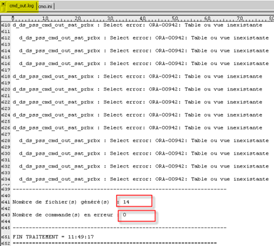
Interface monitoring .log files will be stored in a LOG directory. These log files keep a record of all the integrations/extractions that are completed, and contain notifications for any errors that may occur. It is possible to open the log file to view the result of an integration/extraction and troubleshoot any reported error.
An IN folder for incoming interfaces or a OUT folder for outgoing interfaces stores the files to integrate or extract in .XML format.
A SAVE folder: stores backup copies of integrated XML files.
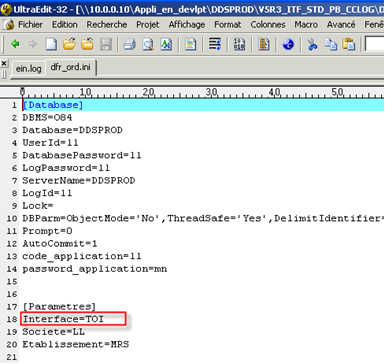
An .INI file contains database connection data and ensures the interface runs as expected
If the code specified on the "interface" line of the .INI file differs from that declared in Back Office (Maintenance/Interface menu), then integration or extraction cannot run successfully.
TRANSCODIFICATION
DSI-DFR exchanges require a transcodification to be implemented in incoming and outgoing interfaces. This transcodification is handled for specific Back Office codes transferred by interface.
Transcodification-related management rules
The management rules will be the following:
Exceptions:
In case there is no transcodification, the “comments” tab in DFR will contain information.
Interfaces between DSI and DFR
DSI provides the departure forwarder in the order batch.
An order may only belong to one agency but a file may contain orders that are for different agencies.
To meet this need, the following points are essential:
1/ IN DSI, a departure third party code must be created to identify the forwarder interfaced with.
2/ In DFR a third party code that will be the same as the departure third party code in DSI must be created or transcoded.
3/ In DFR, this agency third party code (Third party code field) must be assigned (Back Office /Maintenance /Agencies menu),
This is necessary for the incoming interface DFR_ORD to be able to assign DSI orders to the relevant agencies.
If no pairing up can be found, the order is to be marked as in error (information fed to DFR_ORD's LOG) and the cause provided is that an order could not be assigned to an agency.
To be verified: Take into account DSI order’s departure third party and compare it with the agency third party of DFR’s Back Office. This way the order can be automatically assigned to the appropriate agency.
See also
How to transfer DDS Freight bookings in DDS Shipper transfer DDS Freight bookings in DDS Shipper
How to transfer initial DDS Shipper checkpoints in DDS Freight transfer initial DDS Shipper checkpoints in DDS Freight